
The World’s Largest Star Wars Collection
It’s official. As of September 11, 2013, The Guinness Book of World Records recognizes the collection of Stephen J. Sansweet as the largest collection of Star Wars memorabilia in the world, with an estimated 300,000 pieces ranging from bottle caps to videos to arcade games—anything and everything Star Wars. It’s all housed at Rancho Obi-Wan in Petaluma, California. Go there and be amazed.
For more details go here.

Dragon on the Beach
![blinkbox-dragon-skull-1[2]](https://wrmilleronline.com/wp-content/uploads/2013/09/blinkbox-dragon-skull-12.jpg)
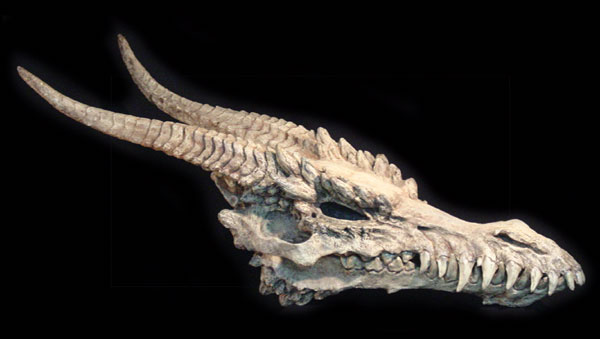
What better way to promote a show with dragons? Place a dragon skull on a beach called Charmouth, on England’s Jurassic Coast, where numerous prehistoric fossils have been found.
![blinkbox-dragon-skull-11[2]](https://wrmilleronline.com/wp-content/uploads/2013/09/blinkbox-dragon-skull-112.jpg)
![blinkbox-dragon-skull-2[2]](https://wrmilleronline.com/wp-content/uploads/2013/09/blinkbox-dragon-skull-22.jpg)
![blinkbox-dragon-skull-3[2]](https://wrmilleronline.com/wp-content/uploads/2013/09/blinkbox-dragon-skull-32.jpg)
![blinkbox-dragon-skull-4[2]](https://wrmilleronline.com/wp-content/uploads/2013/09/blinkbox-dragon-skull-42.jpg)
![blinkbox-dragon-skull-9[2]](https://wrmilleronline.com/wp-content/uploads/2013/09/blinkbox-dragon-skull-92.jpg)
![blinkbox-dragon-skull-7[2]](https://wrmilleronline.com/wp-content/uploads/2013/09/blinkbox-dragon-skull-72.jpg)
![blinkbox-dragon-skull-8[2]](https://wrmilleronline.com/wp-content/uploads/2013/09/blinkbox-dragon-skull-82.jpg)
It took a reported six weeks for Blinkbox to make the 40-foot model and transport it to the beach.
Here’s their “making of” video, posted online July 16, 2013:
http://youtu.be/cP5gQJ6xJfE

Wellington, New Zealand artist Warren Beaton points out sculptor Kim Beaton’s dragon skull is “somewhat cooler”:
Mark Hamill, C-3PO and R2-D2 at the Oscars
Comedian Bob “I’ve got an airport named after me” Hope hosted the 50th Academy Awards® held at the Dorothy Chandler Pavilion in Los Angeles, California on April 3, 1978. Here he introduces Mark Hamill, joined by Anthony Daniels as C-3PO and Ben Burtt’s voice and sounds as R2-D2. Together they present the Special Achievement awards for Sound Effects Editing to Frank E. Warner for Close Encounters of the Third Kind and to Benjamin Burtt, Jr. for the creation of the alien, creature and robot voices featured in Star Wars. The clip includes reaction shots of producer Gary Kurtz and director George Lucas. Posted online June 27, 2013.
Hayao Miyazaki’s Farewell to Feature Animation
On September 6, 2013, The Japan Times sponsored a press conference in which renowned director Hayao Miyazaki formally announced his retirement from animated feature films.
Seated next to Mr. Miyazaki is his long-time colleague, producer Toshio Suzuki.
I wish Mr. Miyazaki many more years of a happy, healthy and productive life.
In His Words: George Lucas on Personal Success
In a speech presented at the Academy of Achievement, George Lucas talks about how he became a filmmaker, and in following his passions, and the advantages of “joy” over “pleasure.” His wisdom is dispensed here:

From the Cosmic Mind: The Cosmic Fox
On July 15, 2013, Michel Gagné premiered the opening segment of The Saga of Rex, adapted from his graphic novel published by Image Comics.
Share in the wonder of Rex:
Here’s a pencil test of Rex where he meets Aven, “an enigmatic biomorph.” uploaded August 13, 2013:
“The Saga of Rex: The Animated Film Project Pt. One: Abduction” was funded by 880 backers through Kickstarter.com.

Power Rangers Ninja Turtles
Oh, dear. Jason David Frank of the Power Rangers is about to be attacked by a Teenage Mutant Ninja Turtle at Wizard World 2013. Who will win?

Photo (c) Jason David Frank
Space Battleship Yamato, Chapter 7
At last, Yamato’s finale is here. Here’s a 15-second peek from Bandai:
Chapter 7 contains episodes 23-26. Dai-nanashō: Soshite Kan wa Iku / “And Now the Warship Comes” premiered August 24, 2013 in Japanese theaters, followed by a release on DVD and Blu-ray on October 25, 2013. Yamato, hassin!